• Car enthusiast? Join us on Cars Connected! iOS | Android | Desktop
  • Hint: Use a descriptive title for your new message
    If you're looking for help and want to draw people in who can assist you, use a descriptive subject title when posting your message. In other words, "I need help with my car" could be about anything and can easily be overlooked by people who can help. However, "I need help with my transmission" will draw interest from people who can help with a transmission specific issue. Be as descriptive as you can. Please also post in the appropriate forum. The "Lounge" is for introducing yourself. If you need help with your G70, please post in the G70 section - and so on... This message can be closed by clicking the X in the top right corner.

SXM Issues with Nav Update

FrankieD

Registered Member
Joined
Jun 23, 2019
Messages
212
Reaction score
162
Points
43
Location
Atlanta, GA, USA
Genesis Model Type
Genesis G70
Hey all,

I updated my nav with the new update that was released earlier this week, and I'm having an issue with my SXM.

The download and update in the car both went well, using the SD card that was in the car, but after the update was completed in the car, I tried to set some SXM presets, but it wouldn't let me. Every time I tried saving a channel, SXM would restart saying "Preparing SiriusXM radio..." and not save/favorite the channel. I did both on the radio screen, as well as through the menu channel list, and both would result in the same issue. There was no issue with saving FM stations.

I've called Genesis and they weren't any help, saying it was a SXM issue, and I also sent a message to them through the update site, but haven't heard anything back yet. Haven't called SXM yet, but will probably do that soon.

I was wondering if anyone else has had this issue after updating to the latest nav software? And if so, did you figure out a resolution?

Thanks in advance for any help!
 
It may just be the SD card that needs to be replaced. Been using the same one for everything update so it may be causing an issue 🤷🏽‍♂️
I've used the same SD card with each of the updates I've done. I think this is my third update.
 
Hey all,

I updated my nav with the new update that was released earlier this week, and I'm having an issue with my SXM.

The download and update in the car both went well, using the SD card that was in the car, but after the update was completed in the car, I tried to set some SXM presets, but it wouldn't let me. Every time I tried saving a channel, SXM would restart saying "Preparing SiriusXM radio..." and not save/favorite the channel. I did both on the radio screen, as well as through the menu channel list, and both would result in the same issue. There was no issue with saving FM stations.

I've called Genesis and they weren't any help, saying it was a SXM issue, and I also sent a message to them through the update site, but haven't heard anything back yet. Haven't called SXM yet, but will probably do that soon.

I was wondering if anyone else has had this issue after updating to the latest nav software? And if so, did you figure out a resolution?

Thanks in advance for any help!
Try resetting the head unit by pushing in the little pin hole underneath the volume button. I usually experience a lag for the SXM channel images/logos to show up but everything else works fine.
 
Try resetting the head unit by pushing in the little pin hole underneath the volume button. I usually experience a lag for the SXM channel images/logos to show up but everything else works fine.
I’ve done that multiple times already. I’m going to try to do the multi-cycle start stop...sometimes that helps. Fingers crossed it works
 
Looking to update and upgrade your Genesis luxury sport automobile? Look no further than right here in our own forum store - where orders are shipped immediately!
I’ve done that multiple times already. I’m going to try to do the multi-cycle start stop...sometimes that helps. Fingers crossed it works
I’m experiencing the same issue with not being able to save SXM favorites. What is the “multi-cycle start stop” you’re talking about?
 
I’m experiencing the same issue with not being able to save SXM favorites. What is the “multi-cycle start stop” you’re talking about?
I’m the past with certain infotainment issues, Genesis Customer Care told me to turn on the car until radio boots up, then turn it off. Repeat those steps 3-4 times, then do a soft reset and it resolves, or should resolve infotainment issues. Haven’t tried it yet, but will later.
 
Called Sirius about the presets. Apparently there was a new update and policy change on their end which may be causing an issue for some cars. The rep sent a refresh signal and said to wait until tomorrow to try again...he said it should work. If not, it should be back to normal in a week...and if it doesn’t work then too, to call the tech support department and troubleshoot with them.
 
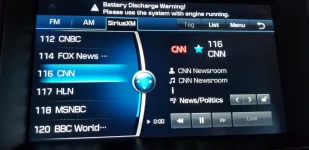
I'm having an issue as well after updating the Nav. system. However, mine is with the presets arrangement. Instead of the presets being saved in the order that I'd like them to be in, they are being organized numerically according to their channel. Anyone else having this issue?
Sirius.webp
 
I'm having an issue as well after updating the Nav. system. However, mine is with the presets arrangement. Instead of the presets being saved in the order that I'd like them to be in, they are being organized numerically according to their channel. Anyone else having this issue?
View attachment 35784
From what I read, the new update puts the stations in numerical order. Have no idea who thought that would be a good idea 🤦🏽‍♂️
 
I'm having an issue as well after updating the Nav. system. However, mine is with the presets arrangement. Instead of the presets being saved in the order that I'd like them to be in, they are being organized numerically according to their channel. Anyone else having this issue?
View attachment 35784
That started with the prior update (November of 2020?). It is very annoying and just plain stupid.
 
Back
Top