• Car enthusiast? Join us on Cars Connected! iOS | Android | Desktop
  • Hint: Use a descriptive title for your new message
    If you're looking for help and want to draw people in who can assist you, use a descriptive subject title when posting your message. In other words, "I need help with my car" could be about anything and can easily be overlooked by people who can help. However, "I need help with my transmission" will draw interest from people who can help with a transmission specific issue. Be as descriptive as you can. Please also post in the appropriate forum. The "Lounge" is for introducing yourself. If you need help with your G70, please post in the G70 section - and so on... This message can be closed by clicking the X in the top right corner.

Aftermarket Proximity Smart Door Lock Module - Anyone install?

skroonigan

Registered Member
Joined
Dec 9, 2019
Messages
49
Reaction score
35
Points
18
Genesis Model Type
Genesis G70
Not having proximity smart door unlock/lock has been kinda driving me nuts with putting the kids in the backseat (pushing the button on the door handle the correct # of times to unlock all the doors vs just the one door). Has anybody installed one of these modules to enable a proximity smart door lock/unlock: Proximity Smart Door Lock Module - Various Applications

Thanks!
 
why not just set the car to unlock all doors with one press, that's how I have mine set..
 
I had no idea such a thing existed. If you end up getting it, let us know how it goes! It would be pretty dang nice to have that.
 
why not just set the car to unlock all doors with one press, that's how I have mine set..

Weird, I never found that setting.. I was specifically looking for it also. I'll look again.
 
I believe that setting is in the screen between your speedometer and RPM tach. Gotta be parked to access it.

Also curious about the device. Not necessary for me, but would be a nice touch
 
Not having proximity smart door unlock/lock has been kinda driving me nuts with putting the kids in the backseat (pushing the button on the door handle the correct # of times to unlock all the doors vs just the one door). Has anybody installed one of these modules to enable a proximity smart door lock/unlock: Proximity Smart Door Lock Module - Various Applications

Thanks!
Keep security in mind using that or even setting for a single touch. Most of the time it is just fine. If you leave places at night you may only want to unlock the driver door, get in and lock it again. With all doors unlocked someone can jump in.
 
Not having proximity smart door unlock/lock has been kinda driving me nuts with putting the kids in the backseat (pushing the button on the door handle the correct # of times to unlock all the doors vs just the one door). Has anybody installed one of these modules to enable a proximity smart door lock/unlock: Proximity Smart Door Lock Module - Various Applications

Thanks!
"The correct number of times"?! What's so hard about pressing the button twice? It's not like you have to enter a cheat code sequence or something.
 
"The correct number of times"?! What's so hard about pressing the button twice? It's not like you have to enter a cheat code sequence or something.
to be fair, there is no second beep to indicate the all doors unlocked. Its happened to me many a time as I get into the car and my wife is still standing outside because I thought the second press worked. I refuse to set all doors to unlock, but the G70 really should have a second beep for when you hit the button twice
______________________________

Help support this site so it can continue supporting you!
 
I think the setting is called 2-press unlock, when check it takes 2 presses of the fob or door button, unchecked 1 press unlocks everything.
 
Looking to update and upgrade your Genesis luxury sport automobile? Look no further than right here in our own forum store - where orders are shipped immediately!
"The correct number of times"?! What's so hard about pressing the button twice? It's not like you have to enter a cheat code sequence or something.

Well, if the driver door is unlocked but the rest of the doors locked you have to actually hit three times, once to lock all the doors and then two more times to unlock all the doors. Tried turning off the 2-press unlock, let's see if that makes thing easier/less annoying. It was a lot easier in my charger, I just touched one of the front door handles and all doors unlocked.
 
I believe that setting is in the screen between your speedometer and RPM tach. Gotta be parked to access it.

Also curious about the device. Not necessary for me, but would be a nice touch

Thanks! I found the setting in the cluster settings... I could have swore I didn't see it in the settings in the center screen, makes sense now.
 
I know you just swapped your setting but, IIRC, you push the button on the passenger's side (regardless of setting) the whole car unlocks. Best of both worlds, possible.

Ah, maybe that's what was confusing me.
 
Well, if the driver door is unlocked but the rest of the doors locked you have to actually hit three times, once to lock all the doors and then two more times to unlock all the doors. Tried turning off the 2-press unlock, let's see if that makes thing easier/less annoying. It was a lot easier in my charger, I just touched one of the front door handles and all doors unlocked.
Gotcha. Hopefully the 1-press unlock makes it easier for you.

I wish it had the arrangement like your Charger did. The wifey's Lexus has that, and that's the best, other than the few cars that unlock automatically just by walking up to them.
 
Reviving an old thread.

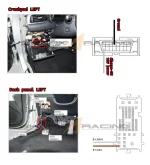
Has anyone gotten this yet? Appears to be quite a useful device but wondering how well it performs and if the install is as simple as it looks.

EDIT: For anyone interested, here's the install schematic:
 

Attachments

  • Proximity - G70.webp
    Proximity - G70.webp
    75.3 KB · Views: 119
It feels like I'm beating a dead horse at this point, but I'll provide an update nonetheless.

So I bought the module. Ordered it on July 20 and it took them forever to actually ship the damn thing (August 4), but once it did it surprisingly arrived very quickly (August 7). I think they provided express shipping to compensate for the long delay in getting the item out, which was nice.

The item itself is pretty small, about 2in x 2in pcb board. It had lengthy wires which was a relief. The install itself is pretty easy, I know the description says you need to splice 4 wires but you can get away with just jamming them in. They fit tightly and get locked into place once you put the connectors back into their slot.

There are two sets of wires you need to access. To get to one set of wires, you need to remove two panels to access the door lock wire assembly. To get to the second set of wires, you only need to remove the fuse box panel and unclip the obd slot from its holder. That way you can easily access the back of the obd tap in to the appropriate wires. I know the instructions say you need to remove the entire crash pad to access the obd but you don't.

The one difficult part was removing the hood latch handle, which is needed to remove the second panel to get to the first set of wires. It's held on by a very weak plastic screw. So weak that I actually broke it. The thing just wouldn't turn no matter how much force was used, and eventually after stripping the head quite a bit, it just broke into pieces and fell out. This kind of worked in my favour because I could remove the handle after it broke. The handle tucks into its slot pretty well and gets held into place by a patch of wires, so even without the screw it's actually pretty secure.

All in all the install was pretty easy. It took about an hour but could easily be done in 30 minutes.

The item itself works exactly as expected. Approach the car and it unlocks (at the same distance as the welcome light). Walk away from the car and it locks after ~5 seconds. You can even disable the feature by hitting lock on the keyfob 4 times quickly, which is great if you're washing the car or taking it in for service. This way you can also tuck the module away and never have to worry about it.

It's a small little robust item that seems to be built quite well and I have no worries about it lasting a long time. Other than the broken screw the install was very easy coming from someone who's never removed panelling on their car before. Overall impressed with my purchase.

Shout out to @Toddasaurus for his guidance on how to remove the panelling for a first timer.
 
That settles it. I’m getting one. With the heat here it would be nice to just walk up and open the door and get in after pre staring remotely. Plus I really like to be able to walk away and have it lock.
 
Back
Top