• Car enthusiast? Join us on Cars Connected! iOS | Android | Desktop
  • Hint: Use a descriptive title for your new message
    If you're looking for help and want to draw people in who can assist you, use a descriptive subject title when posting your message. In other words, "I need help with my car" could be about anything and can easily be overlooked by people who can help. However, "I need help with my transmission" will draw interest from people who can help with a transmission specific issue. Be as descriptive as you can. Please also post in the appropriate forum. The "Lounge" is for introducing yourself. If you need help with your G70, please post in the G70 section - and so on... This message can be closed by clicking the X in the top right corner.

Are the Genesis Connected Services free?

Also, when I was at the car lot yesterday to pick up my car after they fixed the head unit on my car and got Blue Link working, I also tried the horn + starting the car remotely. It still took >30s for it to respond (not just the notification in the app, but for the car to begin honking or to start up). And that was in the middle of San Jose which should have a great signal (I have Verizon and had full signal there, and I presume Blue Link uses Verizon now too with '18 G80's).
I just tried starting my car with my phone on WiFi. It took less than 10 seconds. I think this negates the overloaded servers and slow servers explanation. I use ATT on my phone, I honestly don’t think there’s very good Verizon service in my area. No idea why it takes much longer on cellular.
 
Looking to update and upgrade your Genesis luxury sport automobile? Look no further than right here in our own forum store - where orders are shipped immediately!
Well, my major concern is the "last mile" to/from the car itself and the cell towers. Not sure what the problem is in my case, but I may have some ways to test it, which brings me to another highly relevant point....

Just got off the phone with a person at "corporate" in Hyundai who's basically the last line of support there (so 3rd level or so) and he confirmed with me that he was told that the cars use 4G through Verizon for their Blue Link service (at least mine, the 2018 Genesis G80 Sport). It's actually very hard to find that information on the internet, so this very thread may end up being a source on that (specifically on the 4G part). The info is out there that Hyundai uses Verizon but it was unknown as to which protocol and which cars. So, at least we know they're using newer tech that won't die in a few years on their newer cars (like the 2018 models). It may also apply to older models too, but I'm not sure about that from our convo.

Unfortunately it's still unofficial word of mouth!
 
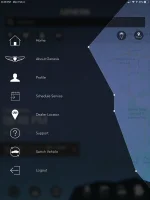
Well, this explains my “Alert Settings” confusion. I made the grave mistake of assuming that the iPad and iPhone apps would be consistent (at least in terms of features, not just design and slow login time).

Comparison of the same hamburger menu in iPad vs. iPhone respectively.
View attachment 17886View attachment 17888


is your ipad a wi-fi only or a wi-fi/LTE?

I have both, and while I only had the app on my phone, I installed it on my ipads to check after reading this, my wi-fi only does not have the alert settings, my wi-fi/LTE does..

my guess is that the app determines if it is not on a cell network, those features are not needed
 
Well, my major concern is the "last mile" to/from the car itself and the cell towers. Not sure what the problem is in my case, but I may have some ways to test it, which brings me to another highly relevant point....

Just got off the phone with a person at "corporate" in Hyundai who's basically the last line of support there (so 3rd level or so) and he confirmed with me that he was told that the cars use 4G through Verizon for their Blue Link service (at least mine, the 2018 Genesis G80 Sport). It's actually very hard to find that information on the internet, so this very thread may end up being a source on that (specifically on the 4G part). The info is out there that Hyundai uses Verizon but it was unknown as to which protocol and which cars. So, at least we know they're using newer tech that won't die in a few years on their newer cars (like the 2018 models). It may also apply to older models too, but I'm not sure about that from our convo.

Unfortunately it's still unofficial word of mouth!

I know it used 4gLTE and I think I mentioned it earlier in this thread (or maybe another) download an app called The Architecture of Radio on you iphone,

this app is a 360° visualization of the "infosphere" it shows you the inter-connected system of digital communication devices around you in a visual wavelength form.

Fire off a connection to your car from the app, use the Vehicle Status Update screen and choose refresh, as this forces the car to call out to the servers, then point your phone at the car with the above app running, you will see your car pop up as a digital receiver/transmitter and it will define the connection 3G/4G/Wi-Fi, whatever is in use at the time the connection is made.

The car uses both 3G and 4G depending on signal strength, I've seen both pop up on the visualizer from the car depending on the area I was in.
 
Yeah I remember it mentioned before. I wanted to verify with the manufacturer directly since it may vary by device and the information online was anecdotal. Good to have direct confirmation from an employee.

this app is a 360° visualization of the "infosphere" it shows you the inter-connected system of digital communication devices around you in a visual wavelength form.

Interesting. So... how does it work?

as this forces the car to call out to the servers, then point your phone at the car with the above app running, you will see your car pop up as a digital receiver/transmitter and it will define the connection 3G/4G/Wi-Fi, whatever is in use at the time the connection is made

Oh that’s rad, so... your car was marked as a public WiFi hotspot? Because that’s not how this works. They use publicly available information in order to render the data viz. if you read the description on the app itself they tell you it’s not for measurement. Not sure how your phone could gather actual data about the 4G/3G radio devices around you. Visualize based on premeasured data using ARKit? Sure, that’s easy. DL a database of coordinates and known cell towers and hotspots and superimpose in ARKit.

Not sure what the app showed you but it definitely wasn’t actually using your iPhone to not only detect RF but then to locate it and superimpose it in AR... having had experience both in AR development and data visualization, and just knowing what’s required to localize an RF signal like that, I’m pretty sure iPhones are not equipped with those kinds of sensors. Not in 3D space. WiFi I have seen (particularly due to how SSID beacons work, and maybe passive mode detection) but not 4G/3G RF/tx detection and especially not on iOS.
 
p.s. to clarify:

Oh that’s rad, so... your car was marked as a public WiFi hotspot? Because that’s not how this works.

According to the app, all of the information you're seeing is basically derived from a public database. Also, I think it's feasible for them to map data gathered by the device itself (albeit unlikely as they don't state that they do that, plus it would be difficult to do without you walking around enough for them to triangulate position based on signal strength), for example see this tool (Android only): Wi-Fi Visualizer - Apps on Google Play. So, the only way I would see that particular app (or any app) showing you an actual WiFi hotspot would be via publicly gathered data.

From the app site:
This app is not a measurement tool.
... and importantly...
The Architecture of Radio is a data visualization, based on global open datasets of cell tower, Wi-Fi and satellite locations. Based on your GPS location the app shows a 360 degree visualization of signals around you. The dataset includes almost 7 million cell towers, 19 million Wi-Fi routers and hundreds of satellites.

So, however you determined that your car is using 4G is likely through some other method than the app, most likely. Not to say it probably isn't a really badass data visualization 😁
 
Yeah I remember it mentioned before. I wanted to verify with the manufacturer directly since it may vary by device and the information online was anecdotal. Good to have direct confirmation from an employee.


Interesting. So... how does it work?


Oh that’s rad, so... your car was marked as a public WiFi hotspot? Because that’s not how this works. They use publicly available information in order to render the data viz. if you read the description on the app itself they tell you it’s not for measurement. Not sure how your phone could gather actual data about the 4G/3G radio devices around you. Visualize based on premeasured data using ARKit? Sure, that’s easy. DL a database of coordinates and known cell towers and hotspots and superimpose in ARKit.

Not sure what the app showed you but it definitely wasn’t actually using your iPhone to not only detect RF but then to locate it and superimpose it in AR... having had experience both in AR development and data visualization, and just knowing what’s required to localize an RF signal like that, I’m pretty sure iPhones are not equipped with those kinds of sensors. Not in 3D space. WiFi I have seen (particularly due to how SSID beacons work, and maybe passive mode detection) but not 4G/3G RF/tx detection and especially not on iOS.


I'll see if I can snap a screen shot of what comes up,

it is using the wi-fi and cell signal for something, putting the phone in airplane mode only shows the satellites and cell towers in their database, but not any wi-fi services, hot spots, etc.

I realize it is not for measurement, but it is using the cell signal and the wi-fi signal to pick up local signals somehow, and pointing at the car shows it as an "unknown carrier" and it is the car, showing 1-2 meters away, unless my driveway is some unknown service in a public database.
 
I'd be interested in it somehow showing that your car us utilizing 4G. That would be pretty amazing.
 
my guess is that the app determines if it is not on a cell network, those features are not needed

I don’t think so. Here is a shot of my iPad that uses the cellular network and there are no alarm settings. Can you send a shot from your iPad that has settings.
17912
 
I have both, and while I only had the app on my phone, I installed it on my ipads to check after reading this, my wi-fi only does not have the alert settings, my wi-fi/LTE does..

Sorry, I totally missed this comment. I’m surprised there’s inconsistency between your two iPads (then again, given my previous rant, maybe I shouldn’t be). I don’t think the iPad’s capabilities should matter. At the application layer, it’s all just “internet”, regardless of how the app gets there (either over your WiFi or over your cell carrier). Or should be. If it really mattered, you could easily test it by disabling WiFi but keeping cellular on.

Instead, I think it’s more likely that the app version itself differs on each iPad. e.g. Your Wifi one has an older version and your WiFi+cellular ipad has a newer one (probably).

Maybe try updating the app on both iPads, see what happens
______________________________

Help support this site so it can continue supporting you!
 
If you go to support it will show the version. Mine is 2.8.14 Prod Thatis the most current iPad version

It’s hard to believer there is another iPad app that shows the alarm settings. Please let us know.
 
Sorry, I totally missed this comment. I’m surprised there’s inconsistency between your two iPads (then again, given my previous rant, maybe I shouldn’t be). I don’t think the iPad’s capabilities should matter. At the application layer, it’s all just “internet”, regardless of how the app gets there (either over your WiFi or over your cell carrier). Or should be. If it really mattered, you could easily test it by disabling WiFi but keeping cellular on.

Instead, I think it’s more likely that the app version itself differs on each iPad. e.g. Your Wifi one has an older version and your WiFi+cellular ipad has a newer one (probably).

Maybe try updating the app on both iPads, see what happens

might be the ipad OS version at that., the non-cellular ipad can't be updated past iOS 10.x it's fairly old.
 
If you go to support it will show the version. Mine is 2.8.14 Prod Thatis the most current iPad version

Same version that I have on my iPhone. I'm not at home so I don't have my iPad with me but if your iPad has that version and my iPhone has that version but only the iPhone has Alerts then I think it's definitely a consistency issue on Genesis' side.
 
Yes they hsve the same version but they don’t have the same functionality. I don’t think Geness ever envisioned setting alarms from an iPad. Conversely, There may be some functions on the iPad that are not present on the iPhone.
 
p.s. This is exactly what I just got done doing today. Same car (‘18 G80 Sport) and same process. Got the remaining balance of the service completely free. I spoke with a kind lady named Candice and she basically had me all wrapped up within 30mins or so (emailed copies of paperwork). They are doing a fantastic job taking care of us as new Genesis owners (as new owners, not necessarily new cars).

Just too bad we couldn’t also get the free maintenance too! 😭

I just bought my G80 yesterday... take delivery Tuesday. What number did you call to accomplish this?
 
I just bought my G80 yesterday... take delivery Tuesday. What number did you call to accomplish this?

It's on the contact us page (at the bottom) of genesis.com website. It says by phone 844-340-9741 for both Genesis customer care and connected care.

If it's used, they will require a drivers license & a screenshot of your title/agreement with the vin to remove it from the previous owner.
 
Even if you buy it used, you get the remaining balance. I bought my G80 Sport with 10k miles & they transferred the 2 years & 6 months that remained. I did have to call into support & have the account changed as the vin was still under the previous owner. This required me to send a copy of the bill of sale, my drivers license, & registration. Once that was sent, they changed it in about 15 minutes. I have all 3 connected services at no cost.
I only got a year free. I did not get the remainder. My car was only dealer owned with 2500 miles on it, but considered used and only a year old. G80 sport, 2018. Bought it September, 2019. They told me used cars only get 1 year or the remaining balance, whichever was less, if the services had not expired already.
 
I bought a used 2018 ultimate in December of 18. Dealer told me It would not be under the 100K warranty. Just curious - is your factory warranty good for 100K>???? thx b
 
I bought a used 2018 ultimate in December of 18. Dealer told me It would not be under the 100K warranty. Just curious - is your factory warranty good for 100K>???? thx b
10yr/100K drivetrain warranty only goes to first owner. Second and subsequent owners get the base 5yr/60K.
 
Back
Top