• Car enthusiast? Join us on Cars Connected! iOS | Android | Desktop
  • Hint: Use a descriptive title for your new message
    If you're looking for help and want to draw people in who can assist you, use a descriptive subject title when posting your message. In other words, "I need help with my car" could be about anything and can easily be overlooked by people who can help. However, "I need help with my transmission" will draw interest from people who can help with a transmission specific issue. Be as descriptive as you can. Please also post in the appropriate forum. The "Lounge" is for introducing yourself. If you need help with your G70, please post in the G70 section - and so on... This message can be closed by clicking the X in the top right corner.

New System and MAP Update v16 in May

Actually got it working!
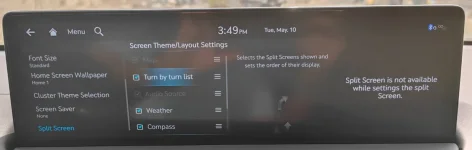
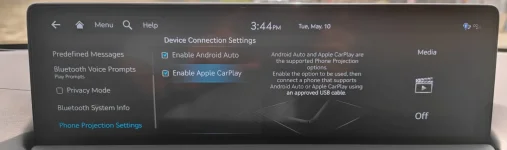
So as mentioned before, in AA developer options, choose 720 x 1280. Then in the cars menu, for Phone Projection, choose Android Auto and uncheck "split screen" and voila! it works!
I also updated my GV70 but have been able to get Android Auto working in full widescreen mode. Where exactly did you uncheck 'Split Screen'?
I do not have that option in my split screen settings. I am also unable to check off Map and Audio Source in the Split Screen settings. This makes me think that full widescreen AA isn't applicable to the GV70, which is unfortunate.
 

Attachments

  • MVIMG_20220510_154410.webp
    MVIMG_20220510_154410.webp
    48.9 KB · Views: 35
  • MVIMG_20220510_154919.webp
    MVIMG_20220510_154919.webp
    42.3 KB · Views: 34
My car arrives next week. Does anybody know if it's supposed to have the latest version? And which number is it? If not, can I ask dealer to download it during PDI? I could download it myself, like I did a couple of times for my 2021 Palisade Calligraphy, so not a big deal. Is it over the air on these cars? Supposedly it was like that with the Pali, but it never worked, so I just did it via a USB, and never connected the Pali to my Wi-Fi (less snooping. Ha ha). Thank you.
 
If it were me, and hearing that you know how to install the updates, I would not ask them to do it. Giving them any opportunity to screw something up is not a good idea. Get your new car out of there and run!
 
My car arrives next week. Does anybody know if it's supposed to have the latest version? And which number is it? If not, can I ask dealer to download it during PDI? I could download it myself, like I did a couple of times for my 2021 Palisade Calligraphy, so not a big deal. Is it over the air on these cars? Supposedly it was like that with the Pali, but it never worked, so I just did it via a USB, and never connected the Pali to my Wi-Fi (less snooping. Ha ha). Thank you.
It won't have V16.0, your car was in transit when it was released. Be willing to bet the Dealer won't have it either. I've installed all the updates since my first Genesis without any Nav System problems.
 
Giving them any opportunity to screw something up is not a good idea. Get your new car out of there and run!
You're absolutely correct. And I can say they have screwed up my vehicles 100% of the times I've been there for service, so what was I thinking? Ha ha. The last time I had to take a vehicle for a recall was an Azera in immaculate condition, and was returned with a nasty chip on top of the fender. And yes, they initially tried to blame it on me, but I had gone thru the whole car with the service writer, so that didn't fly. The repair was paid by them, but absolutely AWFUL. Basically had to sell the car after that, since wife wasn't happy (and me neither). And before that, scuffs on panels, leather, center console, etc. And of course they said car was like that already when confronted; geez. So yes, will do it myself after it's available. I do it with a battery charger, by the way, not with the car running, and zero issues. And will use the same USB I used successfully with the Palisade several times. Thank again for your help.
 
So yes, will do it myself after it's available. I do it with a battery charger, by the way, not with the car running, and zero issues.
Great idea! Is that a Battery Tender?
 
No, those are basically 'trickle chargers' (1.25A, I believe); you'd run the battery down with one of those. I use a 5A Optimate6 smart charger, which is the highest amperage you should run on a modern car when directly connected to the battery.
 
Anyone in Canada get the latest update on their 2019-2021 G70?

My car was just at the dealership for an oil change and I asked them to check for an update and they said there wasn't one available.

For interest sake, I have had all of my map updates done at the dealership while the car was in for service. Mostly just because I am lazy, but I have never had an issue. Most of the times they do the full update, but once they just gave me a new SD card.
 
Anyone in Canada get the latest update on their 2019-2021 G70?

My car was just at the dealership for an oil change and I asked them to check for an update and they said there wasn't one available.

For interest sake, I have had all of my map updates done at the dealership while the car was in for service. Mostly just because I am lazy, but I have never had an issue. Most of the times they do the full update, but once they just gave me a new SD card.
Dude just download the app from genesis and do it yourself... Its not hard at all
 
I ordered the card this morning from Genesis. My last update for no charge as my 3 year ownership is July 22.
 
They send you a USB stick for free? Thought only the download was free, and the shipped USB an extra charge, like with regular Hyundais. If free, then it's a nice perk for Genesis owners. I'd order one too, since I'd have to buy a 64G stick just for that. No longer fits on the 32G that I have, reportedly.
 
Looking to update and upgrade your Genesis luxury sport automobile? Look no further than right here in our own forum store - where orders are shipped immediately!
Downloaded it for my 2019 G70 on Saturday and installed it with no issues. No more nixie tubes!!!!!!
 
They send you a USB stick for free? Thought only the download was free, and the shipped USB an extra charge, like with regular Hyundais.
They are free for the first three years for original owners, maybe others, too. When checking out of the cart it may look like you'll be charged but they zero it out in the end.
 
Installed the new update today. 30ish minutes and no issues with install.

I have a question, and possibly a gripe. I hope a Genesis UI designer actually looks at this forum for input, though I doubt it.

First with the question: Is there a way to get back the previous radio/SXM selection icons? It was much easier than the current disaster of press/hold/scroll down on the left side. Or is that really the way they are going to release the UI for a "premium" car experience?

If the latter...what the hell is Genesis thinking? Can you not hire some designers who can deliver a simple, smooth, upscale and functional UI? It's great you got rid of the tubes. I know some of you liked that design, but I still scratch my head over that design decision. I love my 2019 G70, really. But maybe the experience when driving shouldn't feel like a Hyundai Elantra??
 
Good UI is something most brands seem to struggle with. It's a shame.
 
Did the last update change the quality of the sound. Maybe my brain is imagining it, but I was really happy with the sound quality before the update, now things seem flat. I moved my settings as they were before but still seems off. Also, nice to have the album art on Sirius but like y'all the UI is not the best. Sorry I mostly lurk, will try to contribute more.

2021 G70 3.3T
 
I'd here to start a new post for this so I'll ask here, does anyone know if OTA update is available for this version? I've always had issues in the past with OTA updates, I wish there's a way to trigger it, do they usually only release the update to be downloaded through USB? and then after a while release it OTA?

I have the 2022 G70.
 
I'm still not seeing any v16 download available for my 2020 G70 in Canada. Looked all throughout the update.genesis.com site, mapnsoft site, as well as launching the Navigation Updater app on the computer to only see 15.x... as the latest version available.

I've done 3 other updates no problem on my own at home. Did this one get pulled offline again?
 
Back
Top