codename_aj
Registered Member
- Joined
- Apr 21, 2022
- Messages
- 41
- Reaction score
- 20
- Points
- 8
- Genesis Model Year
- 2022
- Genesis Model Type
- Genesis GV70
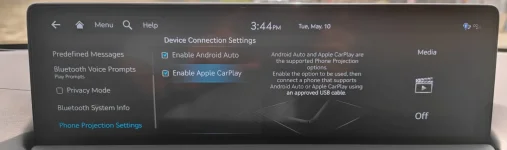
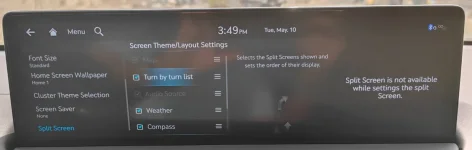
I also updated my GV70 but have been able to get Android Auto working in full widescreen mode. Where exactly did you uncheck 'Split Screen'?Actually got it working!
So as mentioned before, in AA developer options, choose 720 x 1280. Then in the cars menu, for Phone Projection, choose Android Auto and uncheck "split screen" and voila! it works!
I do not have that option in my split screen settings. I am also unable to check off Map and Audio Source in the Split Screen settings. This makes me think that full widescreen AA isn't applicable to the GV70, which is unfortunate.