• Car enthusiast? Join us on Cars Connected! iOS | Android | Desktop
  • Hint: Use a descriptive title for your new message
    If you're looking for help and want to draw people in who can assist you, use a descriptive subject title when posting your message. In other words, "I need help with my car" could be about anything and can easily be overlooked by people who can help. However, "I need help with my transmission" will draw interest from people who can help with a transmission specific issue. Be as descriptive as you can. Please also post in the appropriate forum. The "Lounge" is for introducing yourself. If you need help with your G70, please post in the G70 section - and so on... This message can be closed by clicking the X in the top right corner.

12.5 Map Update

I know this is a G80 forum and my car is a G70. I already post this on the appropriate forum but I've been dealing with mapnsoft for more than 5 years (owned two previous Genesis) and the G70 members are not experienced in this matter. I hope I could get an answer here.
"Finally today I was able to add my VIN to my mapnsoft account. According to the website the last version is NA.11.47.44.462 (Version 12.5) and is ready to be downloaded/ordered to my car but checking the installed version in my car (produced May/15/18) I saw that I have version NAM.11.47.44.465. According to the numbers it seems to me that my car has a "newer" version that the one at mapnsoft. Could be that possible?"


Where do I find out if I have V12.5? When I check I see NA.11.4** and nowhere see any number closer to 12.5.

Also, I just got my car and tried to put the VIN into my Mapnsoft Account but it wouldn't accept it so I left a Trouble Ticket. In their response is a little clue for 2019 Owners.

It said:

"It will usually take a couple weeks for brand new vehicles to be registered into the MapCare database. I recommend registering again after the first week of March.

Please do note that 2019 G80s will receive their first update in early April."

Don
 
Where do I find out if I have V12.5? When I check I see NA.11.4** and nowhere see any number closer to 12.5.

Also, I just got my car and tried to put the VIN into my Mapnsoft Account but it wouldn't accept it so I left a Trouble Ticket. In their response is a little clue for 2019 Owners.

It said:

"It will usually take a couple weeks for brand new vehicles to be registered into the MapCare database. I recommend registering again after the first week of March.

Please do note that 2019 G80s will receive their first update in early April."

Don


you have 11.4* as you stated.
 
Where do I find out if I have V12.5? When I check I see NA.11.4** and nowhere see any number closer to 12.5.

Also, I just got my car and tried to put the VIN into my Mapnsoft Account but it wouldn't accept it so I left a Trouble Ticket. In their response is a little clue for 2019 Owners.

It said:

"It will usually take a couple weeks for brand new vehicles to be registered into the MapCare database. I recommend registering again after the first week of March.

Please do note that 2019 G80s will receive their first update in early April."

Don
No idea how the numbering system works, but I have Map version 12..5 and in setup, it reads. 11.47.44.462
 
"No idea how the numbering system works, but I have Map version 12..5 and in setup, it reads. 11.47.44.462 "

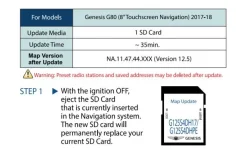
EdP is correct. Here's a screenshot of the 12.5 installation manual that comes with the SD card. These installation instructions are also on the Genesis Mapcare website. v12.5 is NA.11.47.44.xxx. I don't know if the NA # is the same on 2019 models are not.
18217
 
Hers's a question for anyone who has done the update on version 12.5. I have a 2015 3.8 Ultimate and did the update last week. Now it seems the head unit will no longer play DVD's although it still plays CD's. I realize the head unit will not display video while driving, but when the car is in park it used to. It was a good way to kill time while waiting for someone.

Prior to updating to 12.5 I hadn't used the DVD function for several months so it's very possible something may have gone wrong with it and it has nothing to do with the update. So before I take it in for service I wanted to get a idea if others have the same problem after updating.
 
Hers's a question for anyone who has done the update on version 12.5. I have a 2015 3.8 Ultimate and did the update last week. Now it seems the head unit will no longer play DVD's although it still plays CD's. I realize the head unit will not display video while driving, but when the car is in park it used to. It was a good way to kill time while waiting for someone.

Prior to updating to 12.5 I hadn't used the DVD function for several months so it's very possible something may have gone wrong with it and it has nothing to do with the update. So before I take it in for service I wanted to get a idea if others have the same problem after updating.
I did the "12.5" Navigation update on my 2018 G80 Sport (9.2" Premium screen) in Dec. 2018. The DVD/CD player functions the same as prior to the update.
CD - Plays music/audio with car in Park Drive and Reverse
DVD - Displays movie video and plays movie audio with car in Park. No movie video, only audio with car in Drive.

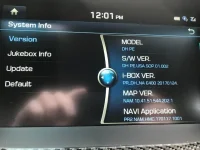
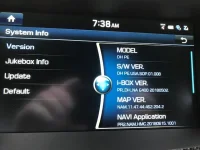
The 12.5 update is likely different code/binary for other car years, models or trim packages (i.e. your 2015 3.8 Ultimate). Posting a screen shot of your model/firmware versions as I did below would help confirm this. This is found in the Main Home screen/Settings/System Info. Your version may have a software bug that changes or is causing the different functionality in your DVD/CD player subsequent to the 12.5 Navigation update.

Screenshot of firmware versions before and after the "12.5" Navigation update are below.
Before
18311
After 12.5 Update
18305
The "12.5" update SD card for my 2018 G80 Sport is part number G125P2DHPE. SD card has the following information printed on it.
2018-2019 Map Update \ G125P2 \ DHPE \ 2018 G80 \ (9.2in Premium)
 
Last edited:
Hers's a question for anyone who has done the update on version 12.5. I have a 2015 3.8 Ultimate and did the update last week. Now it seems the head unit will no longer play DVD's although it still plays CD's. I realize the head unit will not display video while driving, but when the car is in park it used to. It was a good way to kill time while waiting for someone.
Based on you can play CDs but not DVD's this may be a region code issue. Region code technology is not applicable to CDs.

The DVD region code setting on the DVD player may have been reset/changed during the Navigation 12.5 update. Many movie DVD's are encoded with a region code. These DVDs will only play on DVD Players that are configured with the same region coee.

I'll leave it to you to do the research if this applicable to your Genesis DVD player and on how this can be checked/reconfigured. This may be a setting the dealer can only set.
 
Yes that was it, took it to the dealer and they said somehow the region code had been changed. Had to leave it for the morning but now DVD's play fine again. But somehow at the dealers in the process of fooling around with the DVD player and changing the region code something else has been changed.

Now the DVD continues to play and display video while the car is driving. Nothing wrong with that exactly as although I wouldn't watch video while driving a passenger might. So I will definitely not go back to the dealer to correct that LOL.
 
Last edited:
I heard it was possible to download the updates for free some time ago.
Does anyone have a backup of that update for 2015 Hyundai Genesis Ultimate (with 9.2" Navi) he can share?
______________________________

Help support this site so it can continue supporting you!
 
Looking to update and upgrade your Genesis luxury sport automobile? Look no further than right here in our own forum store - where orders are shipped immediately!
I heard it was possible to download the updates for free some time ago.
Does anyone have a backup of that update for 2015 Hyundai Genesis Ultimate (with 9.2" Navi) he can share?

the free update was only for the 8" base system, not for the 9.2" Ultimate system.
 
I see, so the only way is to buy it for $175?
There is no option for download that I can see (and save $30 they charge for a SD card)
 
I see, so the only way is to buy it for $175?
There is no option for download that I can see (and save $30 they charge for a SD card)
You can update the navigation, but nothing else. CarPlay and AA were for the 8" only. The 9.2 got no updates.
 
I see, so the only way is to buy it for $175?
There is no option for download that I can see (and save $30 they charge for a SD card)

that is correct, Carplay/Android Auto do not work on pre-2018 Ultimate vehicles so there is no update free or otherwise. and the MapnSoft update is for the firmware and map updates, it does not give carplay/AA to 9.2" systems. only the 8" systems and the free DL for those is no longer available.

the SD is encrypted and the software is locked to the serial number of the SD, too many people hacking their software I suspect, so now the only way to get it is to pay for it.
 
the MapnSoft update is for the firmware and map updates

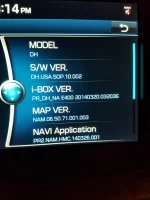
This is interesting... my current Map version is 06.50.71.001.003 (see attached)
What would I get besides new maps if I purchase version 12.5?
I just want to understand if it these changes worth the money.
 

Attachments

  • 20190225_201424.webp
    20190225_201424.webp
    128.1 KB · Views: 9
This is interesting... my current Map version is 06.50.71.001.003 (see attached)
What would I get besides new maps if I purchase version 12.5?
I just want to understand if it these changes worth the money.
AFAIK, on your model is it mostly navigation upgrade. Not sure that you will be getting firmware on your model. As for the map update, it will have some new roads if there has been new housing in areas you travel it may help. The POIs will be updated but again, depends on your use. If a Best Western in Ohio is now EconoLodge, it only matters if you are travelling nearby. Of course, you may also miss a new Dunkin Donuts too.
 
While true, i don’t think it works in 2018 either. Not sure about 2019.

I have a 2018 sport which has the same unit as the ultimate and I have CarPlay and AA on mine.
 
I have a 2018 sport which has the same unit as the ultimate and I have CarPlay and AA on mine.

Well I guess I must be wrong, maybe it only applies to the G90. What size is your screen and does it use the jog dial?
 
Well I guess I must be wrong, maybe it only applies to the G90. What size is your screen and does it use the jog dial?


9.2”. And yes
 
Back
Top