• Car enthusiast? Join us on Cars Connected! iOS | Android | Desktop
  • Hint: Use a descriptive title for your new message
    If you're looking for help and want to draw people in who can assist you, use a descriptive subject title when posting your message. In other words, "I need help with my car" could be about anything and can easily be overlooked by people who can help. However, "I need help with my transmission" will draw interest from people who can help with a transmission specific issue. Be as descriptive as you can. Please also post in the appropriate forum. The "Lounge" is for introducing yourself. If you need help with your G70, please post in the G70 section - and so on... This message can be closed by clicking the X in the top right corner.

Genesis Connected Services

So I lock my car manually with the keyfob. When I load up my app, it still says my car is unlocked. If I want to remote start my car, I have to lock the car first, then click on Engine Start. Is this a bug or did I forget to turn something off/on in the settings?
 
So I lock my car manually with the keyfob. When I load up my app, it still says my car is unlocked. If I want to remote start my car, I have to lock the car first, then click on Engine Start. Is this a bug or did I forget to turn something off/on in the settings?

When you go into the app, check the "Vehicle Status" button - what you see initially isn't necessarily live. For example right now mine is showing that it was last update on June 26 at 21:56 ... which is probably the last time I drove the car. The app doesn't check in between, nor does it refresh just by going into it. You can hit the refresh icon though and it'll pull a live status.
 
Question from a newbie - just got connected and trying out engine start. Set my favourites remote engine start but now want to change one (temp too low). How can I edit or delete?
 
Looking to update and upgrade your Genesis luxury sport automobile? Look no further than right here in our own forum store - where orders are shipped immediately!
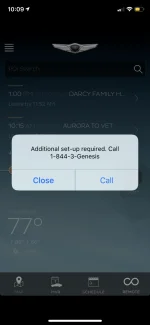
It's been 10 days of ownership and I *STILL* can't use the app. I get this error:

21560

I opened a ticket with that phone number last week, and used the app to report the problem.

I have to say, I am VERY disappointed with the way the issue has been handled: non-chalant reps regurgitating to me that "it takes up to 7 business days for a technician to diagnose the problem", "they have gone home for the weekend", etc etc.

There's no accountability whatsoever.

I think I may email HMA today to express my frustration.

It's a little thing, the app... but with the amount of money I paid for a car with tech features, I find it unacceptable that I can't use any of the ones associated with app after 10 days!

Would've been nice to cool off my car a couple days this past week before I got in it!

First world problems, I know.

😡
 
It's been 10 days of ownership and I *STILL* can't use the app. I get this error:

View attachment 21560

I opened a ticket with that phone number last week, and used the app to report the problem.

I have to say, I am VERY disappointed with the way the issue has been handled: non-chalant reps regurgitating to me that "it takes up to 7 business days for a technician to diagnose the problem", "they have gone home for the weekend", etc etc.

There's no accountability whatsoever.

I think I may email HMA today to express my frustration.

It's a little thing, the app... but with the amount of money I paid for a car with tech features, I find it unacceptable that I can't use any of the ones associated with app after 10 days!

Would've been nice to cool off my car a couple days this past week before I got in it!

First world problems, I know.

😡
Go to the dealer where you bought the car. The salesman needs to setup the app for you. It's something that' THEY HAVE TO DO before delivering the car. Dealers have a "special" account that facilitate the process.
 
Go to the dealer where you bought the car. The salesman needs to setup the app for you. It's something that' THEY HAVE TO DO before delivering the car. Dealers have a "special" account that facilitate the process.
They did that before I left the dealership, but they did not test it.
 
The dealership doesn't have to be involved. Over the phone the Genesis rep/customer service agent can transfer the "ownership" of the car for the connected services to anyone. It takes a combination of talking on the phone, registering online & pressing the small reset button next to the volume knob to get this done.

This is how I had mine done after being unable to connect upon delivery of the car. Took five minutes. The phone number can be found on the website or when you're in the car go the the "Genesis Connected Services" app and there will be a phone number in the sub-menus. Call that.
 
The dealership doesn't have to be involved. Over the phone the Genesis rep/customer service agent can transfer the "ownership" of the car for the connected services to anyone. It takes a combination of talking on the phone, registering online & pressing the small reset button next to the volume knob to get this done.

This is how I had mine done after being unable to connect upon delivery of the car. Took five minutes. The phone number can be found on the website or when you're in the car go the the "Genesis Connected Services" app and there will be a phone number in the sub-menus. Call that.
Can you elaborate on this?

No one I've spoken to on the phone knows what the issue is. The car is registered. My email is registered. The setup was done at the dealership. The dealer cannot help me and says to wait for a call back from Connected Services. Connected Services are practically ignoring me and keep on saying the same thing: "it takes up to 7 days."

I've reset the radio, reinstalled the app, reset my password... nothing seems to work. I NEVER had an issue with BlueLink.

Beyond frustrated.
 
I'll post a detailed answer after work which hopefully helps. Have you registered currently with Genesis Connected Services? In other words can you login or not (regardless of the car actually being linked to your account). This will just help my reply stating the steps which worked.
 
I'll post a detailed answer after work which hopefully helps. Have you registered currently with Genesis Connected Services? In other words can you login or not (regardless of the car actually being linked to your account). This will just help my reply stating the steps which worked.
Yes. I can log into the app no problem.

Thanks!
 
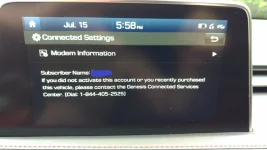
Alright, so a bit of background. I had my car about three weeks and as a previous corporate demo the Genesis Connected Services "Subscriber" name was showing someone named Lisa. The dealer said they could change it and register however after a few weeks, emails, phone calls, etc. and pretty sure that the local Genesis rep was just a middle man doing the same thing I found this in the menu in the car:

21636

Likely the same number as online but I never checked. I'll also note at the time I couldn't register my vehicle at all with Genesis Connected Services as the "name and address do not match" or something along those lines. So after calling that number here is what happened.

1) The rep on the phone told me to register again, prompting the same error "name and address do not match". She then told me to click OK and try 3 more times, and voila, it then registered the account. Nice little trick they have hidden there. So all the info is now registered and Genesis Connected Services can see it on their end but it is not "active" or linked to your physical car.

This seems to be where you are maybe.

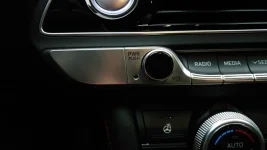
2) Afterwards she asked me to go into my car and start it up. Done. Then when prompted I was told to insert a tiny pointy object and press the small unit button next to the volume knob. Done.
 
Last edited:
Button next to volume knob:
21637

She then said she could "see" the car and everything is linked now. And that was it. The app/online service then showed the car upon a login/logoff and I've been using the service ever since. (Well, actually I barely use it at all but likely will in the winter. The novelty has worn off).

Now I posted a short version of this a while back. I believe someone else was told they had to email/fax in a copy of proof of purchase. I didn't, and the fact that you are in the car and can start it is sort of how they "verify".

This all took about 5 minutes and I was very impressed.

@Ruissimo - Any other questions let me know, hopefully this helps you and anyone else having this issue.
 
Last edited:
Button next to volume knob:
View attachment 21637

She then said she could "see" the car and everything is linked now. And that was it. The app/online service then showed the car upon a login/logoff and I've been using the service ever since. (Well, actually I barely use it at all but likely will in the winter. The novelty has worn off).

Now I posted a short version of this a while back. I believe someone else was told they had to email/fax in a copy of proof of purchase. I didn't, and the fact that you are in the car and can start it is sort of how they "verify".

This all took about 5 minutes and I was very impressed.

@Ruissimo - Any other questions let me know, hopefully this helps you and anyone else having this issue.
It was me about a month ago that you helped with getting “connected”. I did have to email proof of ownership to get car in my name for Warranty, concierge etc - had to do this first through a Hyundai Canada (I’m in Canada) and they accepted proof and all was good for that part. When I asked about Connected Services they said that was another number but they would connect me - got disconnected. Went back to my Connected Services phone number and they flipped some switch and all good. Didn’t need to do the pin hole reset thing. Anyway, may be different here in Canada. Thanks for your help. Good luck Ruissimo.
 
I'll put my address in my signature. I'm in Canada too.

Seems like 10 ways to skin a cat type scenario which may be part of the problem.
 
It's been 10 days of ownership and I *STILL* can't use the app. I get this error:

View attachment 21560

I opened a ticket with that phone number last week, and used the app to report the problem.

I have to say, I am VERY disappointed with the way the issue has been handled: non-chalant reps regurgitating to me that "it takes up to 7 business days for a technician to diagnose the problem", "they have gone home for the weekend", etc etc.

There's no accountability whatsoever.

I think I may email HMA today to express my frustration.

It's a little thing, the app... but with the amount of money I paid for a car with tech features, I find it unacceptable that I can't use any of the ones associated with app after 10 days!

Would've been nice to cool off my car a couple days this past week before I got in it!

First world problems, I know.

😡
Had an issue with mine for like 2 weeks as well when taking ownership of my g70. They took a while but did get it resolved. You need to bring it up to your sales rep.
 
What I don’t really understand is how the blue link app is fully updated to run with the new iPhone resolution (X and above) while the Genesis app is not.
 
Back
Top